All the features you expect. Presented in a simple, user-friendly interface.
Fax With Email
Sending a fax with email is simple. Attachments are automatically converted and added to your outgoing fax. Compatible with dozens of document formats.
Inbound faxes are delivered to your email as PDF files, which you can easily view, print, & save.
Fax With Your PC or Mac
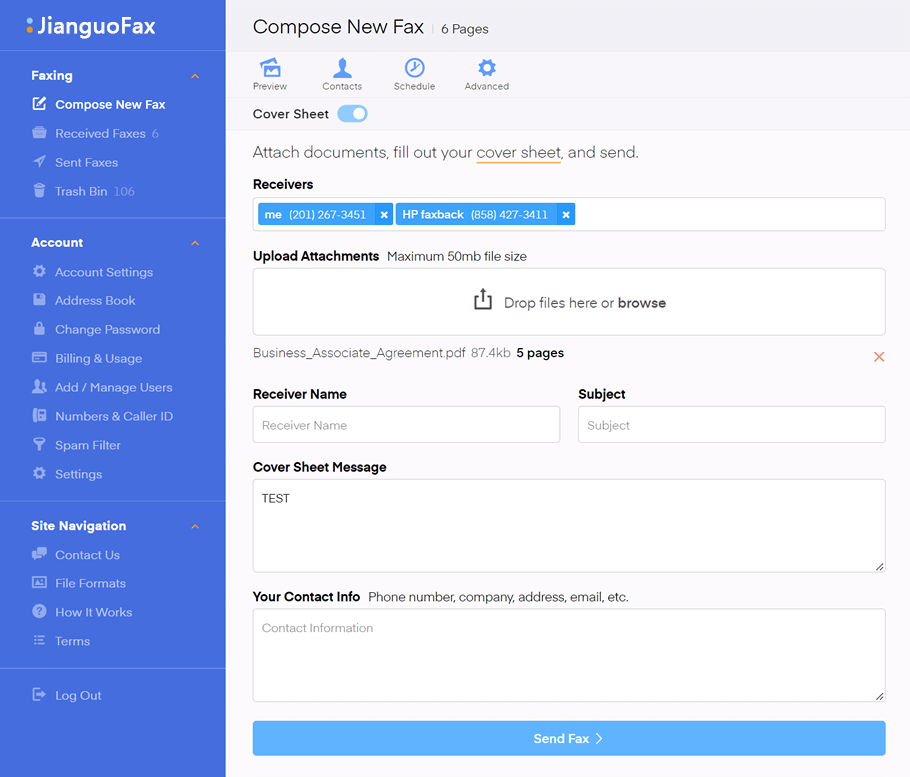
Faxing with your PC is as easy as dragging and dropping your attachments. Navigate to the compose new fax section in your dashboard, and send to one or more fax numbers. No special software required.
Search, view, and download your entire faxing history in the dashboard.
Fax With Your Phone
The JianguoFax web app is optimized for mobile devices, making for efficient faxing on the go. Seamlessly fax pictures and documents directly from your phone or tablet in a snap. Using the camera on your mobile device makes it easy to send informal faxes when time is limited.
JianguoFax is the only online fax service with no per-page overage fees.
| Comparison | JianguoFax | Efax | MyFax | HelloFax |
|---|---|---|---|---|
| Additional Users | 10 | 5 | 5 | 5 |
| No Page Limits | ||||
| No Setup Fees | ||||
| Free Number Transfer | ||||
| Premium Features | ||||
| Mobile Web App | ||||
| End-to-End Encryption | ||||
| Two-Factor Login | ||||
| Dropbox Syncing | ||||
| Google Drive Syncing | ||||
| API | ||||
| Zapier Support | ||||
| Scheduled Faxes | ||||
| Spam Blocker | ||||
| Custom Caller ID | ||||
| Multiple Recipients Per Fax | ||||
| Address Book | ||||
| Create Contact Lists | ||||
Send Faxes With Your PC, Phone, or Tablet
Navigate to the compose new fax section in your dashboard. Drag and drop your attachments (or use the camera on your phone) to send faxes to one or more recipients. Create contact lists in the address book section and send faxes to multiple destinations with a single click.
Send Faxes With Email
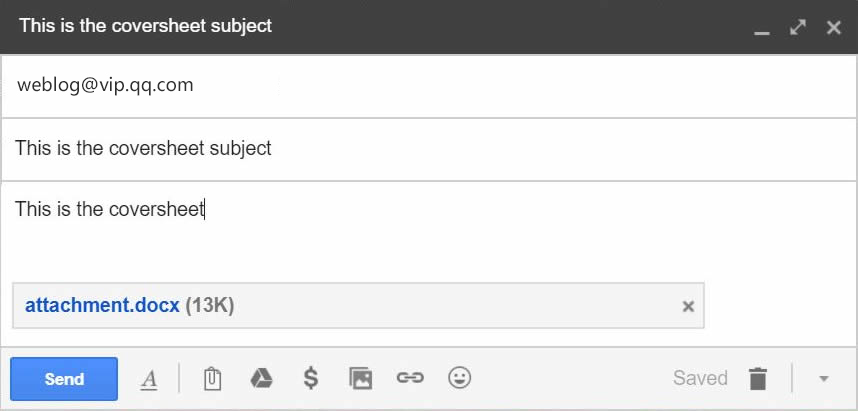
Send an email to <fax number>@jianguosoft.com and fill out the email subject and body - this becomes your cover sheet.
Attach your documents, such as pdf or doc, and send. You will receive a confirmation email to let you know that the fax was sent successfully.
Receiving Faxes
During signup, choose a local fax number in any area code. Every incoming fax is automatically sent to your email as a pdf file which can be printed, saved, or forwarded. There are never any busy signals even if multiple faxes are being received at the same time.
You can also view your entire history of sent and received faxes in your dashboard page.
View A Sample Fax In Your Email
Enter your email address to receive a sample fax from our service.
Our faxing capacity has been tested for 99.98% uptime and reliability.